
Dashboard
Withdrawals
Review and approve withdrawals, and track the balance they are paid from.
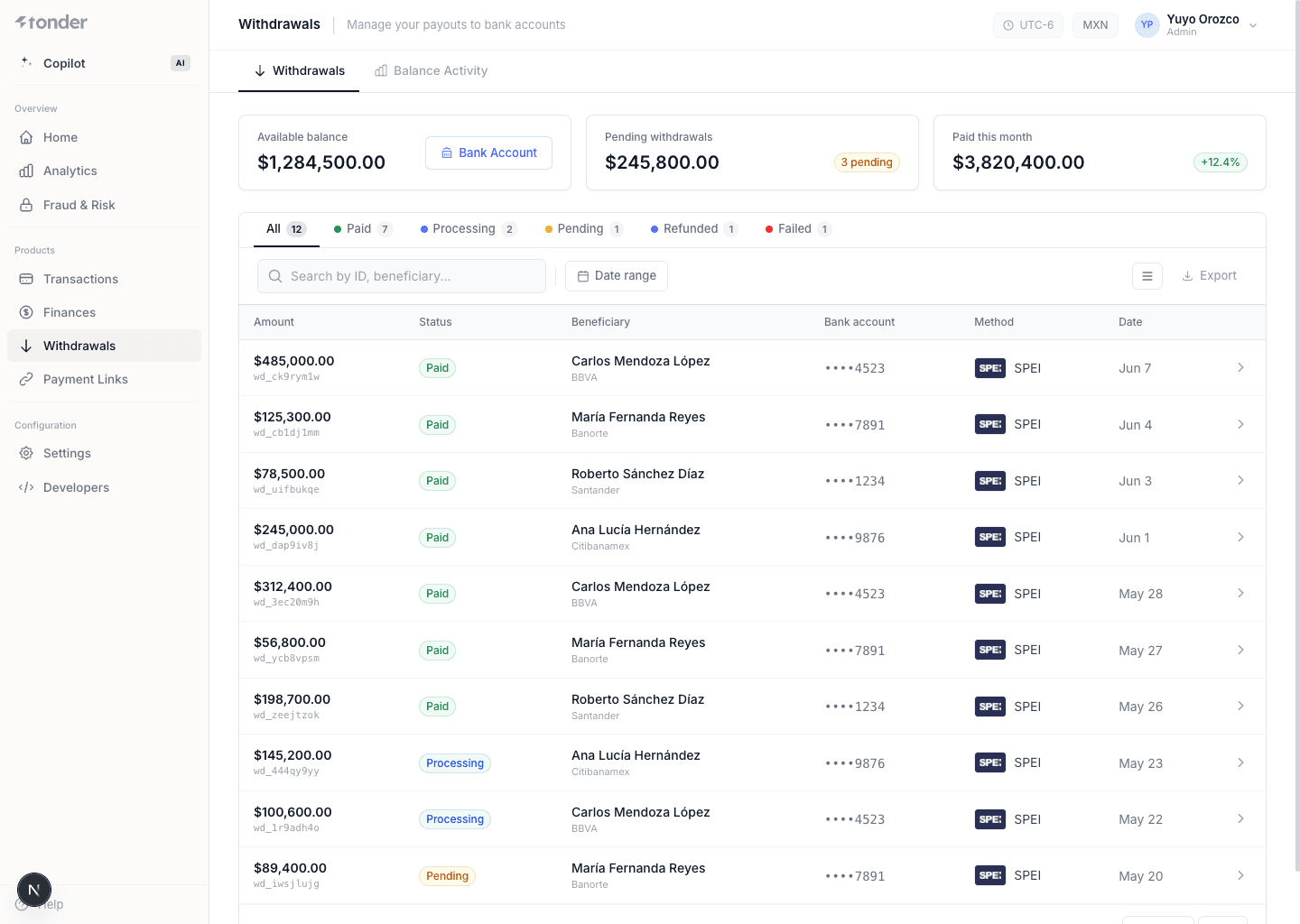
Withdrawals is the screen for monitoring outgoing payouts and your balance activity. Here you see each withdrawal, its stage in the processing flow, and how it affects your available balance.
Tabs
- Withdrawals — the list of payouts with amount, beneficiary, method, and status.
- Balance activity — the movement of your balance (inflows, outflows, and holds) that gives context for why funds are available or in transit.
Withdrawal statuses
A withdrawal moves through a status flow:
| Status | Meaning |
|---|---|
Pending | Created, waiting to be processed or on hold. |
Processing | Sent to the provider for disbursement. |
Success | Paid in full to the beneficiary. |
Declined | Rejected (check the reason and retry if applicable). |
Cancelled | Cancelled. |
Failed | Failed. |
How to use it
- Filter by status or date to audit disbursements.
- Review balance activity to reconcile why a withdrawal is
Pending(funds in transit) or available. - Handle
Declinedpayouts by checking beneficiary data before retrying.
This screen documents the dashboard view. To create withdrawals and see the endpoint, status flow, and webhooks, use Withdrawals (API Direct).
Create and operate withdrawals via API
Next steps
Was this page helpful?