
Home
The home screen's KPIs: volume, acceptance, methods and recent transactions.
The Home page is your control center: a live summary of your payment performance with KPIs, volume trends, and breakdowns by payment method and issuing bank. It's built so that, at a glance, you know how the business is doing and where to act.
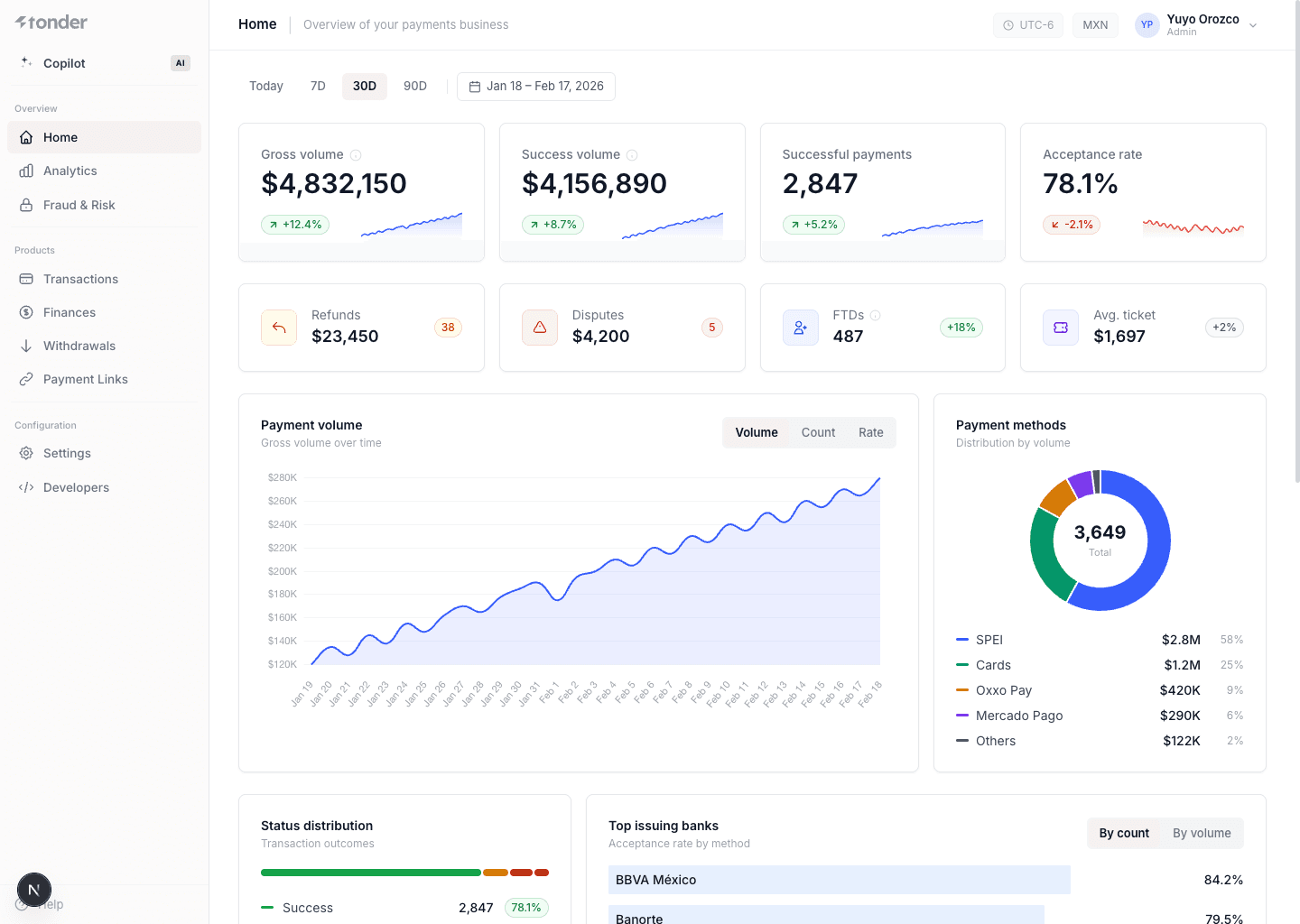
Primary KPIs
Total value of all transactions processed, across every payment method.
Total value of transactions that were completed successfully.
Number of transactions that completed successfully.
Successful payments ÷ total paymentsPercentage of transactions that were approved.
Count and volume. Excludes expired, pending, and duplicates.
Secondary KPIs
Total amount refunded and number of refund transactions.
Total amount under dispute (chargebacks) and number of open disputes.
First-time deposits — number of unique customers who paid for the first time.
Average transaction amount across all successful payments.
Charts & sections
Gross volume over time. Toggle between dollar amount, transaction count, or acceptance rate.
Donut chart showing how volume splits across SPEI, Cards, Oxxo Pay, Mercado Pago, and others.
Breakdown of all transactions by outcome: Success, Pending, Declined, Failed.
Acceptance rate for each issuing bank, ranked best to worst. Toggle by count or volume.
30-day heatmap of daily acceptance rate.
Green ≥80%, amber 50–79%, red <50%.
Most frequent decline codes with their count.
Includes severity level.
Cards ≠ APMs. The card acceptance rate and the APM conversion rate (SPEI, Oxxo Pay, Mercado Pago) are always reported separately — they measure different things and should never be blended into a single number. See Analytics.
No duplicates. Every metric is deduplicated: each payment intent is counted once, even if there were retries behind the scenes. All metrics respect the date range selected at the top (Today, 7D, 30D, 90D, or custom).
How to use it
- Adjust the date range (top right) to focus your analysis.
- Use each KPI's delta to spot sudden changes and dig deeper in Analytics.
- Click a recent transaction to open its detail.