
Webhooks
Manage webhook endpoints and review every delivery from Developers › Webhooks and Developers › Events.
Developers has two webhook tabs. Webhooks is where you create the endpoints Tonder notifies when something happens — a payment changes status, a refund settles, a withdrawal is paid — and choose the events each one receives. Events shows every webhook sent to those endpoints, with each attempt and your server's response.
Webhooks 2.0 is enabled per account. If Developers in your dashboard has no Events tab, your account is on the previous version: ask your Tonder contact to enable it.

Webhooks tab
- Create an endpoint: name,
https://URL, authentication method and the events it receives. - Send a test to confirm your server answers
2xx. - Edit, disable, rotate the signing secret or delete an endpoint from its actions menu.
- See each endpoint's subscribed events, error rate over the last 24 hours and status.
Step by step in Endpoints.
Events tab
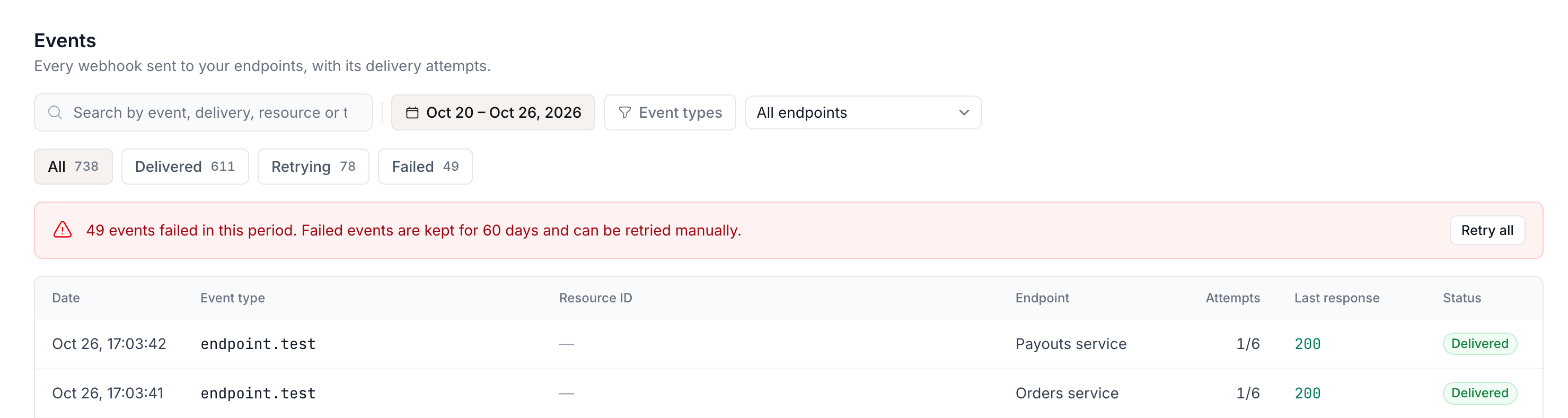
- Tabs by status — All, Delivered, Retrying, Failed — with filters and search.
- Each event's details: payload, attempts and your server's responses.
- Resend event, or Retry all for every Failed event in the filter.
Details in Events log. Transactions and withdrawals also show the webhooks sent for each record, in the Webhook events section of their details.
This screen documents dashboard management. For payload formats, the event catalog, signatures and how delivery works, use the Webhooks section.
Formats, events, and delivery
How it works
Webhook model and formats.
Events catalog
Which events exist and their payloads.
Verify signatures
Check that every webhook comes from Tonder.
Delivery and retries
What counts as delivered, retries and resending.