
Endpoints
Create webhook endpoints, choose the events each one receives, and manage them from the dashboard.
An endpoint is the URL on your server that receives webhooks. With Webhooks 2.0 you can have up to 10, and each one receives only the events you select for it.
Webhooks 2.0 is enabled per account. If Developers in your dashboard has no Events tab, your account is on the previous version: ask your Tonder contact to enable it.
The previous version is covered in Accounts without Webhooks 2.0.

Create an endpoint
Open the Webhooks tab
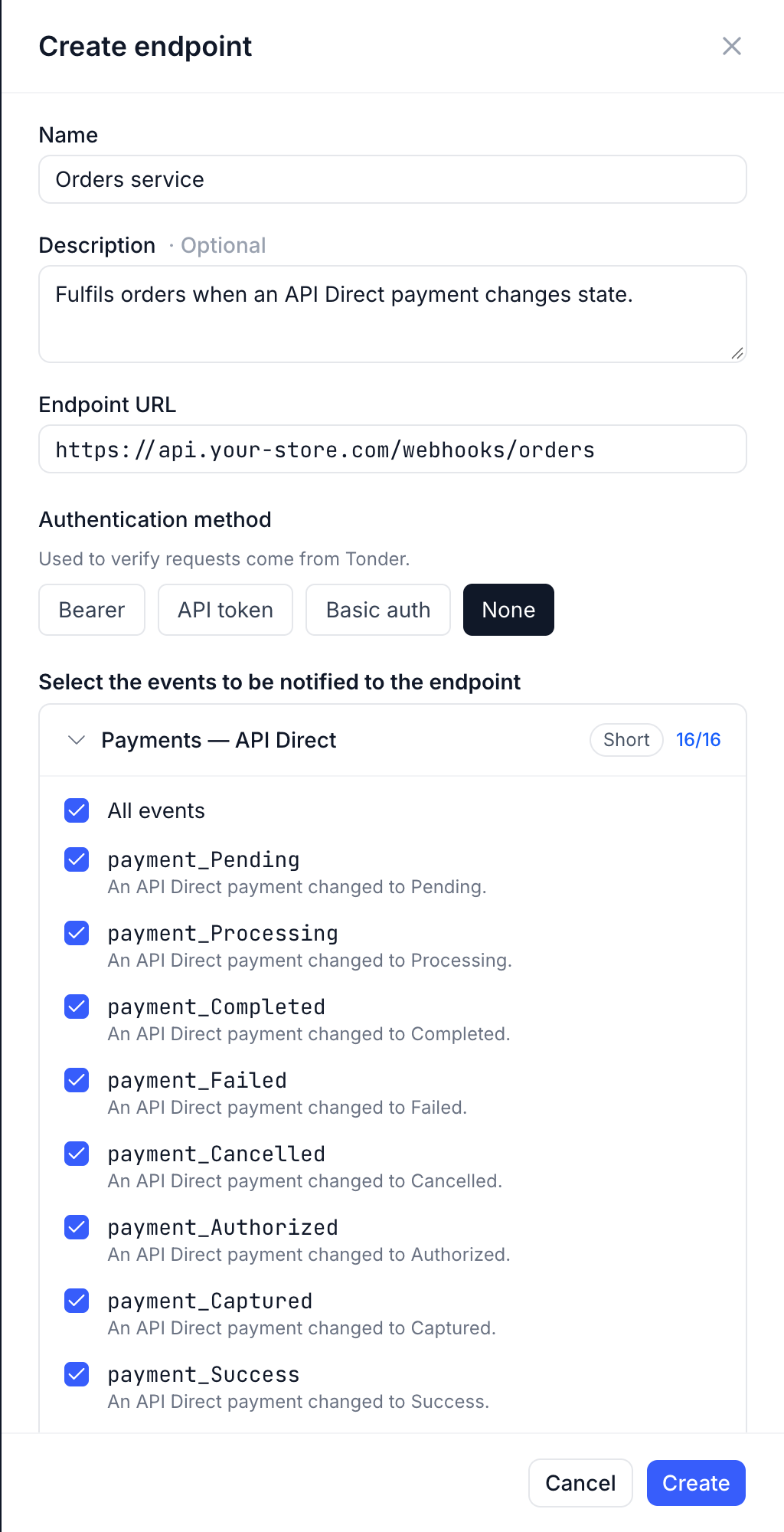
In the dashboard, go to Developers › Webhooks and click Create endpoint.
Name it and set the URL
- Name — up to 80 characters. Description is optional.
- Endpoint URL — must start with
https://. Private and internal addresses (for example127.0.0.1) are rejected.
Choose the authentication method
Pick what your server expects on every request — see Authentication headers. Every webhook is signed as well, whatever you pick.
Select the events
Under Select the events to be notified to the endpoint, tick the events this endpoint should receive, or All events in a group. Each group shows its payload format (Short or Long); the full list is in the Events catalog.
Create and keep the signing secret
Click Create. The dashboard shows the Signing secret once: copy it to your server now, because it will not be shown again. You use it to verify signatures. Store it as a server-side secret — an environment variable or a secret manager — never in front-end code or your repository.
Send a test
In the endpoint's actions menu, choose Send test. Tonder sends an endpoint.test event, which
appears in the Events log with your server's response. A 2xx means
the endpoint is ready.
Authentication headers
| Authentication method | What your endpoint receives |
|---|---|
| None | Only Tonder's signature headers. |
| Bearer | Authorization: Bearer <your token> |
| API token | Your token in the header you name — X-API-Key by default. |
| Basic auth | Authorization: Basic base64(username:password) |
The token, header name and credentials are values you choose; Tonder stores them and sends them on every request. Verify the signature in every case: an authentication header is an extra layer, not a replacement.
Generate a long random value for each endpoint, and don't reuse your Tonder API key or any other credential. Keep tokens out of the endpoint URL: the URL is shown in the endpoint list.
Manage endpoints
Each endpoint in Developers › Webhooks has an actions menu:
| Action | What happens |
|---|---|
| Edit endpoint | Change the URL, authentication or events. The change applies from the next event; events already being retried continue. |
| Send test | Sends an endpoint.test event, whether or not the endpoint subscribes to it. |
| Disable | The endpoint stops receiving events until you enable it again. Its pending retries end as Failed ("Endpoint unavailable"). |
| Rotate secret | Generates a new signing secret; the previous one keeps signing for 24 hours. See Rotate the secret. |
| Delete | The endpoint stops receiving events immediately. Its past events stay visible in the Events log. |
The list shows each endpoint's authentication method, subscribed events, error rate over the last 24 hours and status. Everything on this screen is also available through the Webhooks API.
Troubleshooting
- The endpoint isn't receiving an event: check that it is Active, subscribed to that event,
publicly reachable over HTTPS, and answering a
2xxwithin 10 seconds. Find the event in the Events log to see what your server answered. - The URL is rejected when you create the endpoint: it isn't
https://, or it points to a private or internal address. - Your server rejects the requests: check that it expects the authentication method and credentials configured on the endpoint, and that it verifies the signature against the current secret.
Accounts without Webhooks 2.0
On the previous version you register one URL through the API, and that URL receives every event.
Security requirements: use a secure (HTTPS) URL, configure an authentication method (BEARER,
API_TOKEN, or BASIC_AUTH) to verify requests come from Tonder, and validate the event structure
and content before processing.
Register the URL
Register a new URL with the /webhooks/ endpoint. You can configure authentication to secure your
endpoint:
curl -X POST https://stage.tonder.io/api/v1/webhooks/ \
  -H "Authorization: Token YOUR_API_KEY" \
  -H "Content-Type: application/json" \
  -d '{
    "url": "https://your-site.com/webhook-handler",
    "auth_method": "BEARER",
    "credentials": {
      "token": "a-secure-bearer-token-you-generate"
    }
  }'
The response confirms the created endpoint:
{
  "id": 123,
  "url": "https://your-site.com/webhook-handler",
  "status": "active",
  "auth_method": "BEARER",
  "credentials": {
    "token": "a-secure-bearer-token-you-generate"
  }
}| Field | Type | Description |
|---|---|---|
id | integer | Unique identifier for the endpoint. |
url | string | The URL you registered. |
status | string | Webhook status (active, inactive). |
auth_method | string | Authentication method (BEARER, API_TOKEN, BASIC_AUTH). |
credentials | object | Associated authentication credentials. |
Save the webhook id for management operations.
Authentication methods
What your endpoint receives depends on the auth_method you configure:
auth_method | What you configure in credentials | What your endpoint receives |
|---|---|---|
BEARER | token | Authorization: Bearer <token> |
API_TOKEN | header and token | <header>: <token> — literal, verbatim |
BASIC_AUTH | username and password | Authorization: Basic base64(username:password) |
With API_TOKEN you define both the name of the header and its value, and we send it
verbatim, adding no prefix. To receive Authorization: Token abc123, configure
header: "Authorization" and token: "Token abc123". A header of your own, such as X-Api-Key,
also works.
{
  "url": "https://your-site.com/webhook-handler",
  "auth_method": "API_TOKEN",
  "credentials": {
    "header": "X-Api-Key",
    "token": "a-secret-you-generate"
  }
}
In all cases the secret is generated by you. We store it and resend it on every notification so your backend can validate it.
Manage the URL
| Operation | Method | Endpoint | Purpose |
|---|---|---|---|
| List | GET | /webhooks/ | Retrieves all configured endpoints. |
| Update | PUT | /webhooks/{webhook_id}/ | Updates an endpoint's configuration. |
| Delete | DELETE | /webhooks/{webhook_id}/ | Removes an endpoint (it stops receiving notifications). |
curl -X GET https://stage.tonder.io/api/v1/webhooks/ \
  -H "Authorization: Token YOUR_API_KEY"
curl -X PUT https://stage.tonder.io/api/v1/webhooks/123/ \
-H "Authorization: Token YOUR_API_KEY" \
-H "Content-Type: application/json" \
-d '{ "url": "https://your-updated-site.com/webhook-handler" }'curl -X DELETE https://stage.tonder.io/api/v1/webhooks/123/ \
-H "Authorization: Token YOUR_API_KEY"On the previous version the endpoint must answer a 2xx within 30 seconds, and each event is
delivered once — see Without Webhooks 2.0.