> ## Documentation Index
> Fetch the complete documentation index at: https://docs.tonder.io/llms.txt
> Use this file to discover all available pages before exploring further.
# Settlement Details
The Settlement Details page in Tonder's dashboard provides in-depth information about each settlement. This page will guide you through the details you can access for each settlement.
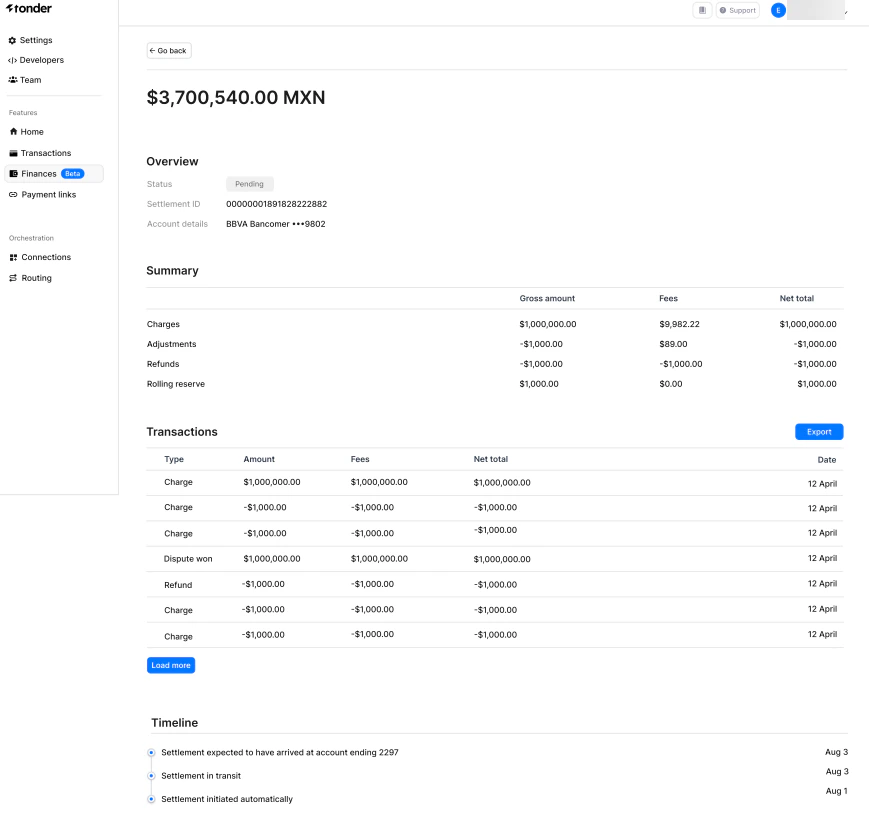 ## Settlement details overview
When you click on a specific settlement row in the Finances section, you are directed to the Settlement Details page. Here, you can view comprehensive information about the settlement, including:
| Field | Description |
| --------------- | ------------------------------------------------------------------------------------ |
| Amount | The total monetary value of the settlement. |
| Status | The current status of the settlement (e.g., pending, paid). |
| Settlement ID | A unique identifier for the settlement. |
| Account Details | The bank account information where the settlement will be deposited. |
| Charges | The total amount of charges included in the settlement. |
| Adjustments | Any adjustments made to the settlement amount, such as corrections or changes. |
| Refunds | The total amount of refunds processed within the settlement period. |
| Rolling Reserve | Funds held to cover potential risks and liabilities, to be released at a later date. |
## Transaction details
Within the Settlement Details page, you can also access detailed information about each transaction included in the settlement. This includes:
| Field | Description |
| --------- | ------------------------------------------------------------------ |
| Type | The nature of the transaction (e.g., charge, refund, dispute won). |
| Amount | The monetary value of the transaction. |
| Fees | Any fees associated with the transaction. |
| Net Total | The amount after deducting fees. |
| Date | The date when the transaction occurred. |
The timeline helps you track the progress of your settlement and anticipate when the funds will be available in your bank account.
## Settlement details overview
When you click on a specific settlement row in the Finances section, you are directed to the Settlement Details page. Here, you can view comprehensive information about the settlement, including:
| Field | Description |
| --------------- | ------------------------------------------------------------------------------------ |
| Amount | The total monetary value of the settlement. |
| Status | The current status of the settlement (e.g., pending, paid). |
| Settlement ID | A unique identifier for the settlement. |
| Account Details | The bank account information where the settlement will be deposited. |
| Charges | The total amount of charges included in the settlement. |
| Adjustments | Any adjustments made to the settlement amount, such as corrections or changes. |
| Refunds | The total amount of refunds processed within the settlement period. |
| Rolling Reserve | Funds held to cover potential risks and liabilities, to be released at a later date. |
## Transaction details
Within the Settlement Details page, you can also access detailed information about each transaction included in the settlement. This includes:
| Field | Description |
| --------- | ------------------------------------------------------------------ |
| Type | The nature of the transaction (e.g., charge, refund, dispute won). |
| Amount | The monetary value of the transaction. |
| Fees | Any fees associated with the transaction. |
| Net Total | The amount after deducting fees. |
| Date | The date when the transaction occurred. |
The timeline helps you track the progress of your settlement and anticipate when the funds will be available in your bank account.