> ## Documentation Index
> Fetch the complete documentation index at: https://docs.tonder.io/llms.txt
> Use this file to discover all available pages before exploring further.
# Webhooks
Webhooks allow applications to send real-time information whenever an event occurs without making frequent requests. It's a passive way of receiving data between two systems through an HTTP POST request. Once you set up Tonder's webhooks, you will receive notifications for every event that occurs during the payment process.
## Why do we recommend you use webhooks?
Webhooks are the best way to ensure your system is up-to-date with payment progress and status. Since the event notifications trigger automatically, your system won't need to perform recurrent requests to Tonder. You will process the payment information on demand.
## How webhooks work in Tonder
Webhooks in Tonder are vital for real-time communication and event notifications. Here's how they work:
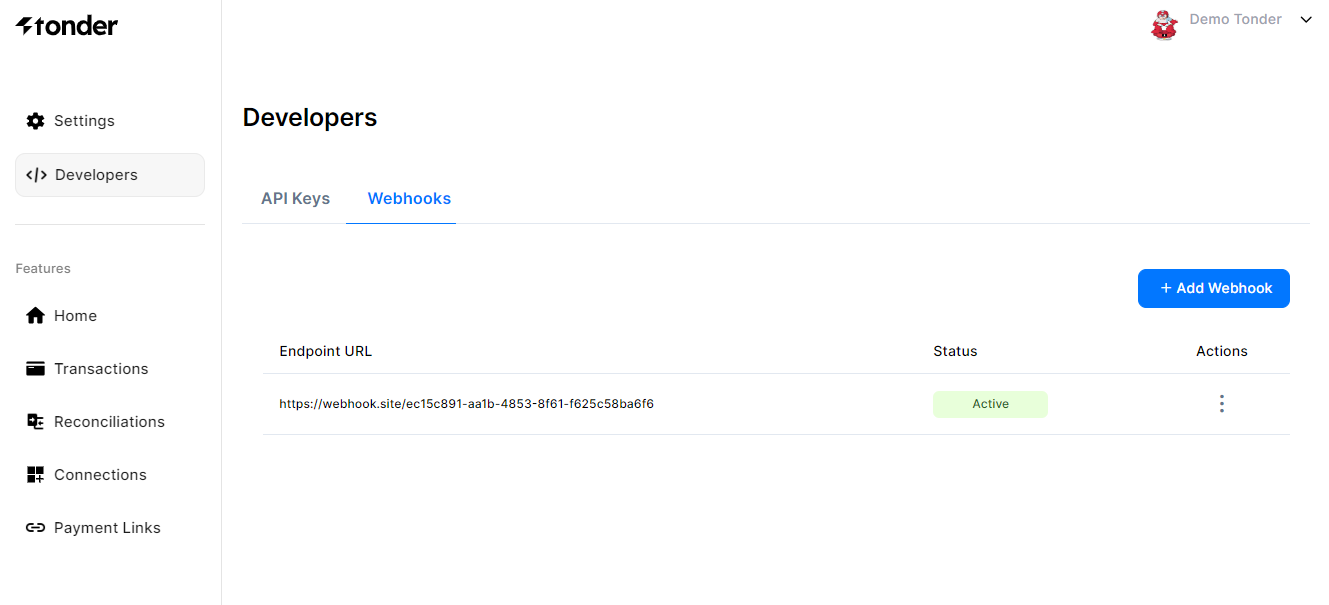
Users or administrators can configure webhooks in the platform to receive event notifications at a specified endpoint URL that is owned and managed by the user's system or application. To do this, follow the steps below:
1. Access the **Webhooks** tab in the Developers tab of the dashboard.
2. Click the **+ Add Webhook** button at the right side of the screen.
3. Enter your new **endpoint URL**.
4. **Confirm** it.
When a webhook URL is added, Tonder will send a first request to confirm the connection is working properly.
During the payment process, various events may occur, such as successful payments, failed transactions, refunds, or other significant payment-related activities.
When an event matching the webhook configuration occurs, the platform generates an event payload with transaction details, payment status, and timestamps.
When a POST request is received by a webhook endpoint owned by the user's system or application, the event payload is processed and actions are performed based on the event information. These actions may include updating internal records, sending notifications to customers or administrators, or triggering other workflows.
After receiving a webhook notification, the user's system usually sends a response (such as an HTTP status code) to acknowledge it.
## Webhooks examples
Tonder uses a variety of webhooks to notify you regarding every action that happens. Below you find examples of webhooks you will receive:
When a customer fills the checkout and tries to pay the transaction, you will receive a webhook with the following payload:
```json theme={null}
{
"transaction_reference": "17672577",
"status": "Success",
"transaction_status": "Success",
"amount": 500,
"currency": "MXN",
"payment_method": null,
"card_brand": null,
"number_of_installments": 1,
"operation_date": "2024-11-29 19:33:21",
"reason": null,
"transaction_type": "PAYMENT",
"provider": "tonder",
"country": "N/A",
"response": {
"customer": {
"email": "test@example.com",
"locale": "en",
"phone": "8115315741",
"ip": "190.29.241.167"
},
"payment_method": "BANKCARD",
"merchant_order": {
"description": "transaction",
"id": "TNDR-aa56f8fb-ba8b-4c66-9f02-1ff2a43e0389"
},
"payment_data": {
"amount": 500,
"auth_code": "hHB6d9",
"created": "2024-11-29T19:33:21Z",
"currency": "MXN",
"id": "17672577",
"is_3d": true,
"status": "COMPLETED",
"type": "PAYMENT"
},
"card_account": {
"expiration": "11/2025",
"holder": "pedro perez",
"issuing_country_code": "US",
"masked_pan": "400000...0085",
"token": "03c48f9b-1d59-8c4f-5297-7f0cfb63cb29"
}
},
"related_transaction_reference": null,
"number_of_payment_attempts": 1,
"metadata": {
"test_id": "Text example",
"order_id": 9879798789
}
}
```
Use [https://webhook.site/](https://webhook.site/) as the endpoint URL to test our webhooks.
 ## Why do we recommend you use webhooks?
Webhooks are the best way to ensure your system is up-to-date with payment progress and status. Since the event notifications trigger automatically, your system won't need to perform recurrent requests to Tonder. You will process the payment information on demand.
## How webhooks work in Tonder
Webhooks in Tonder are vital for real-time communication and event notifications. Here's how they work:
## Why do we recommend you use webhooks?
Webhooks are the best way to ensure your system is up-to-date with payment progress and status. Since the event notifications trigger automatically, your system won't need to perform recurrent requests to Tonder. You will process the payment information on demand.
## How webhooks work in Tonder
Webhooks in Tonder are vital for real-time communication and event notifications. Here's how they work: